|
Welcome to the E-Slate Voting System! |


|
· Turn the SELECT wheel until your choice is highlighted in blue. |
|
Step 1: Enter Your Access Code |





|
PREV |

|
NEXT |

|
HELP |




|
ENTER |

|
SELECT |



|
Step 2: Make Your Ballot Choices |





|
PREV |

|
NEXT |

|
HELP |




|
ENTER |

|
SELECT |


|
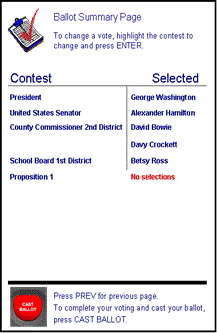
After you have voted all the pages of the ballot, a Ballot Summary Page appears, allowing you to review your selections. To change your vote, turn the SELECT wheel until the contest you want to change is highlighted, then press ENTER. This will return you to that particular contest. You may also use the PREV and NEXT buttons to review your ballot. When you have finished voting press the red CAST BALLOT button. You have now finished voting. |
|
Step 3: Review and press “Cast Ballot” |





|
PREV |

|
NEXT |

|
HELP |




|
ENTER |

|
SELECT |




|
Press the HELP button once to get the help screen. Press HELP twice to notify an election official to assist you. |
|
Use PREV to go to the previous page. Use NEXT to go to the next page. |
|
When you have finished voting, Press the CAST BALLOT button to record your votes. |
|
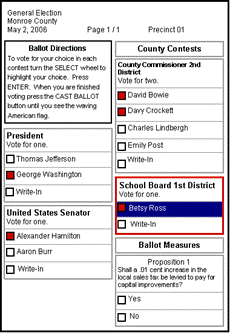
Turn the SELECT wheel to highlight your choices. |
|
Press ENTER to vote for a selected choice. |
|
GETTING FAMILIAR WITH THE E-SLATE FEATURES |
|
Your ballot has been cast & accepted when you see the waving American Flag |





|
PREV |

|
NEXT |

|
HELP |




|
ENTER |

|
SELECT |





|
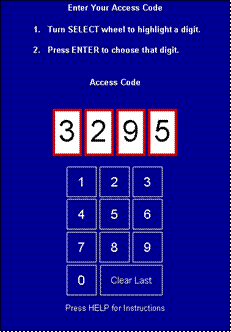
· The purpose of the ACCESS CODE is to ensure that the E-Slate pulls up the correct ballot for your precinct. · It is also an auditing feature to make sure that the number of access codes issued equals the number of ballots cast. · This 4-digit number is randomly generated by computer and is in no way connected to a voter’s name. · No one will know your access code number but you! In fact, it is yours to keep. It is your receipt to confirm that you voted and that your vote counted! |
|
When you sign in to vote, you will be given a 4-digit ACCESS CODE to enter |
|
9 |
|
· Turn the SELECT wheel to highlight the first number of your access code, then press ENTER. · Do the same for the rest of the access code numbers. |
|
· Press ENTER. The box to the left of your choice will turn red to show your choice. · The blue highlight bar will move to the next contest title. · Continue through the ballot until you have voted all the contests you wish to vote for. · You may also use the PREV or NEXT buttons at any time to move through the ballot. |
|
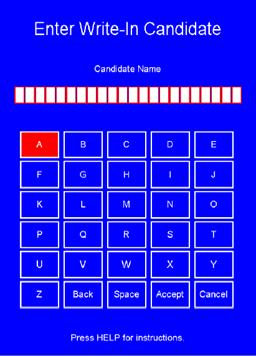
Another Feature that can be utilized on the E-Slate is the ability to enter a “Write-In” candidate. For those steps, see below: |

|
· To cast a Write-In Ballot all you have to do is select the “Write-In” Position for the race that you are voting in. · This will bring up the “Write-In Screen” (see left). · Then using the Select Wheel, spell out the name of the person that you wish to write-in. After entering the first name, select “Space”, then enter the last name. · After entering the name, select “Accept”. This will take you back to the regular ballot screen with the name that you entered showing on the screen as selected under the other choices. · Then continue voting the other races.
· If you make a mistake while entering the write-in name you can select “Back” to erase the misspelled letters. · Or, if you change your mind about entering a write-in name, just select “Cancel”. |





|
PREV |

|
NEXT |

|
HELP |




|
ENTER |

|
SELECT |



|
A |
